Offensive Development Practitioner Course Exam Review
Offensive Development Practitioner Course and Exam Review: My Experience
I’m Jay, a student who spends most of his time on red teaming and malware development. I enjoy understanding how security products detect my code and working through why an approach succeeds or fails. That interest is what brought me to ODPC. Having completed the labs and passed the exam, I wanted to share my experience and what I found useful along the way.
I liked the course, but I got the most out of it when I started exploring beyond the material. Reading additional research, experimenting, and spending time on techniques I could understand properly made a real difference. Simply following a lab and moving on wasn’t enough for me.
Why I Chose ODPC
I wanted an environment with real, configured EDR products where I could test my code and understand what was being detected. Working through a lab at your own pace is useful, but I wanted to see how well I could apply what I’d learned under a time limit.
The course expects you to be comfortable writing and modifying code in C, C++, or C#. Knowledge of Windows internals helps as well. If your experience is mostly limited to running existing tools, expect to spend extra time understanding the code behind them. That focus on development suited what I wanted from the course.
My Experience with the Lab
The lab runs in your own AWS account, and you can access the machines through Guacamole or RDP. The environment includes Cobalt Strike, although access to its team server is restricted. Adaptix C2 is also available, and you can bring your own C2 if you prefer.
The main interest for me was the range of endpoint products. During my lab access, there were seven EDRs:
- CrowdStrike
- Cortex XDR
- SentinelOne
- Elastic EDR
- Microsoft Defender for Endpoint
- Sophos
- Bitdefender
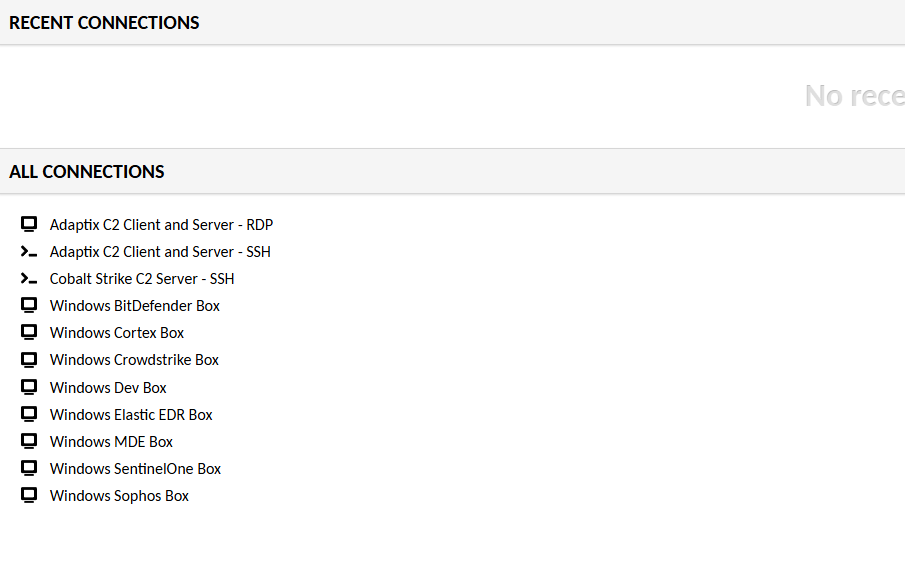
The configurations felt closer to what I’d expect in a company environment than a basic default installation. A binary that successfully called back from one machine could be blocked on another, often for a different reason. AMSI, ETW, WDAC and ASR were also part of the environment. The course page notes that the product list can change, so your lab may differ from the one I used.
That variety made the lab valuable. Getting a loader to work on one endpoint was only part of the picture; I still had to understand why it behaved differently on the others.
Course Content and Structure
The course material is available in the portal. Some labs include videos, while others are text-only. I mainly worked from the written material.
The material follows a sensible order. It starts with lab setup, the PE format, and the Windows API before moving into shellcode, injection, and shellcode placement. Later sections cover dynamic resolution, Cobalt Strike and Adaptix C2, syscalls, unhooking, execution methods, signing, hiding within modules, AMSI, reflective loaders, and DLL proxying. There are also sections on .NET and kernel topics. The final lab brings the material together by having you work against each of the EDR products in the environment.
I appreciated the time spent on the PE format and Windows API before moving into evasion. Understanding the normal behavior first made it easier to follow the later techniques and see why they worked.
Learning Beyond the Course
My biggest takeaway was how much the work outside the course mattered.
The labs introduce techniques and give you an environment to test them, but I needed more time with each idea before I felt comfortable adapting it myself. I read other write-ups, explored additional approaches, and spent plenty of time debugging failed builds. Over time, I focused on the techniques I could explain without referring to the notes. I made more progress by understanding a smaller set of ideas thoroughly than by trying everything I’d recently read about.
If you take ODPC, I’d recommend setting aside time for independent research as well as the labs. Follow up on anything that interests you, and give yourself room to experiment. That extra work helped me during the exam, especially when something failed and I had to figure out what to change on my own.
My Exam Experience
The exam uses a separate environment from the labs. It includes a development machine, Cobalt Strike with a preconfigured profile, an open-source C2 with root access, and four targets. The targets have EDR and other Windows security controls, but the specific products can’t be disclosed.
You can start the exam when you’re ready. You have 48 hours for the technical work, followed by another 48 hours to submit the report. Once the exam starts, the clock keeps running. I’d recommend finishing the labs before beginning it.
The requirements include maintaining a stable beacon on each target, collecting the requested flags, and writing a clear report. The report needs to explain your approach, the code you used, your C2 configuration, and how you handled the security controls, with screenshots to support the results. A callback that immediately dies isn’t enough. You can use the provided Cobalt Strike, Havoc, or your own C2, provided it uses TCP or HTTPS and sends regular heartbeats. Online research is allowed, but you must complete the exam independently.
You can rebuild a machine if you break it, although doing so doesn’t extend the exam time. Reports are reviewed manually, and I was told to expect a turnaround of about five to ten business days. But generally what i see and the time i got my result is in 2 days.
For me, the exam reinforced the same lesson as the labs: understanding my code made it possible to adapt when something didn’t work. That mattered far more than remembering the steps from a walkthrough.
Final Thoughts and Advice
Looking back, I’d take the course again. I’d also keep a separate notebook for my own research, with room for failed attempts and the reasons behind them. After understanding a lab technique, I’d explore other approaches to the same problem and spend more time with the ones that made sense to me.
I’d choose my C2 early and get comfortable using it before the exam. I’d also reserve the reporting window for writing and reviewing the report. Getting the technical results is a major part of the work, but explaining them clearly deserves time too.
Alongside ODPC, I was also taking Zero-Point Security’s UDRL and Sleepmask Development course, which helped me a lot throughout this journey. It gave me a better understanding of advanced UDRL development, why my code was being detected, and how to approach those problems. If you’re unsure what to study next and want to explore these topics in more depth, I’d recommend it too. I found it a useful complement to ODPC, especially when working through my own ideas beyond the labs.
ODPC gave me a structured way to work against real security products, and the lab was the part I valued most. Passing the exam was a satisfying result, but I also came away with a better understanding of my own code and where I needed to improve. Much of that came from the extra research and experimentation I put into the course.